Sample Name
Sample Code
Sample Name
Sample Code
Sample Name
Sample Code
4
NXP Semiconductors
NXPI
When purchasing USD-settled products (such as US stocks, US options and some Singapore stocks), if you use USD margin financing buying power and your account holds Singapore dollars, the excess amount will first use USD margin financing. After the settlement date, if there's still a USD deficit, the system will automatically convert your SGD to USD through the Auto Currency Exchange service to reduce margin interest.
Example:
If you use USD margin financing buying power to purchase US stocks at 3:00 PM ET on May 14, 2025 (which is 3:00 AM Singapore Time on May 15), the USD requirement will settle on May 15 ET. After 9:00 AM Singapore Time on May 16, the Auto Currency Exchange Service will complete the process.
Streamlined Trading Process Trade directly in your margin account, no need to exchange USD in advance.
Efficient Use of Funds Combine your USD and SGD balances to maximize available funds and enhance flexibility.
Lower Costs Prioritizes the use of USD. If your USD is insufficient, it uses SGD automatically. Margin interest applies only when both balances are insufficient.
Auto Currency Exchange references your real-time USD deficit (the lower of your USD deficit from the previous settlement day and your current real-time USD deficit), and then uses your available SGD cash to repay it.
If you have already repaid part of your USD deficit during the day (for example, via a manual exchange), your real-time deficit decreases accordingly, and the Auto Currency Exchange amount is reduced to match — helping you avoid duplicate exchanges.
If your SGD balance is sufficient, this real-time USD deficit will be fully repaid; if your SGD balance is insufficient, all available SGD will be converted, leaving the remaining USD deficit.
You can view USD deficits under: Accounts > Tap an account > Net Assets > Cash Details
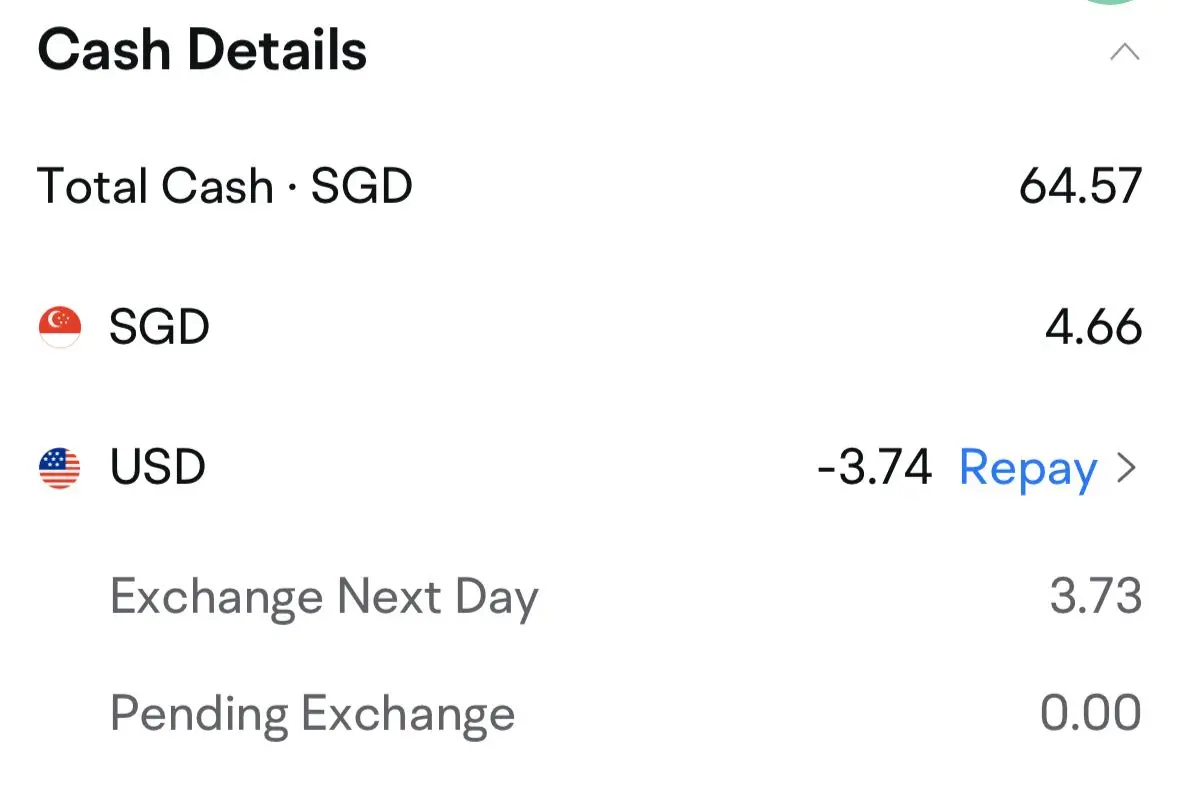
Exchange Next Day: USD deficits from today's settlement will be automatically converted after 9:00 AM Singapore Time tomorrow.
Pending Exchange: USD deficits from tomorrow's settlement or later will be converted after 9:00 AM Singapore Time the day after settlement.
For example, the amount shown in Exchange Next Day on May 15, Auto Currency Exchange will complete the exchange after 9:00 AM Singapore Time on May 16.
Please note that these amounts are reference USD deficits. The actual exchange amount is calculated from your real-time USD deficit and SGD balance, adjusted downward as needed, and will reflect the final Auto Currency Exchange results.
Mobile: Me> Settings > Accounts & Positions > Auto Currency Exchange
Desktop: Settings > Trading > Auto Currency Exchange Note: Auto Currency Exchange service will be unavailable if financing is turned off.
If you turn the Auto Currency Exchange function on or off before 9:10 a.m., the change will take effect at the next scheduled automatic conversion.
Currently, Auto Currency Exchange supports USD deficits and KRW deficits:
Exchange rates are set by the upstream exchange channel. You can check the rates in the app under Fund Details or Statements.
No additional fees are charged for the Auto Currency Exchange service.
When the Auto Currency Exchange is complete, you'll receive a notification. You can also view all records in the app by going to Accounts > Tap an account > History > Fund Details.
Note: If the Fund Details are not shown automatically, you can tap Order History to switch between Order History and Fund Details.
Auto Currency Exchange and SmartSave operate independently at different times.
When you have SmartSave enabled but Auto Currency Exchange is off:
If you trade using your Cash Plus buying power, we check for deficits daily at 6:00 AM and 8:00 AM Singapore Time and redeem your Cash Plus holdings of the same amount to cover.
Redemptions can only repay deficits in the same currency automatically.
For cross-currency deficits, you need to manually exchange currencies after the redemption arrives.
Example: On May 15 at 8:00 AM, your account has:
1,000 USD deficit
0 SGD cash
1,000 SGD and 500 USD in Cash Plus
Then:
500 USD from Cash Plus is redeemed first, leaving a 500 USD deficit.
Suppose the rate is 1.4008 SGD/USD, then 700.40 SGD from Cash Plus is redeemed.
After receiving the SGD redemption proceeds, you must manually convert 700.40 SGD to USD to settle the remaining deficit. If not, you will incur a margin interest charge of 500 USD.
With both SmartSave and Auto Currency Exchange active: After 8:00 AM, you will receive you SGD redemption proceeds from Cash Plus, Auto Currency Exchange automatically converts SGD to USD at 9:00 AM to cover USD deficits.
When purchasing Korean stocks results in KRW payables, the system will automatically scan accounts after Korean stock market close every Korean stock trading day (HKT 14:30-15:00) and execute USD→KRW exchange to settle the day's KRW liabilities. This mechanism ensures Korean stock settlement.
Due to Korean Won special regulations, the system currently does not support customers manually initiating USD→KRW exchanges. When selecting USD as source and KRW as target on the Currency Exchange page, a popup will appear:
" Due to KRW conversion restrictions, the system currently does not support manual USD→KRW conversion. If you buy Korean stocks and owe KRW, the system will automatically convert USD→KRW after the Korean market closes to pay off the KRW you owe that day. Manual USD→KRW conversion is coming soon. Stay tuned.
Applicable Accounts: SG accounts holding Korean stock margin positions with existing KRW liabilities
Execution Time: Every Korean stock trading day, HKT 14:30→15:00 (after Korean stock market close)
Frequency: Once daily
Exchange Amount: Full execution based on real-time KRW liabilities
Insufficient USD Balance: Even if USD balance is negative (overdraft), the system will still execute to prioritize T+2 settlement
KRW forced exchange and the regular multi-currency auto exchange feature are two independent functions that do not affect each other. Regardless of whether the auto exchange feature is enabled or disabled, the system will always scan your account's KRW balance after Korean stock market close and execute forced exchange upon detecting any outstanding liabilities.
| Exchange Direction | Daily Limit | Description |
| USD → KRW | -- | System forced exchange control |
| KRW → USD | KRW 1.5 billion | Customer manual exchange limit |
Q: How much USD will be deducted for KRW forced exchange?
A: Calculated based on the account's real-time KRW liabilities and real-time exchange rate at execution time, settled in full.
Q: Can the exchange be completed if USD balance is insufficient?
A: Yes. The system will prioritize executing the exchange to ensure T+2 settlement, allowing the USD account balance to go negative (overdraft). This can be subsequently repaid through USD deposits or position closing.
Q: Can KRW be exchanged for other currencies?
A: Currently KRW only supports bidirectional exchange with USD. Customers can normally initiate KRW→USD manually; USD→KRW is only executed automatically by the system.
Q: When will KRW forced exchange be triggered?
A: After Korean stock market close every Korean stock trading day (HKT 14:30-15:00), automatically executed once daily if there are KRW liabilities.